



Local API
Local API quickstart
Start the Local API on your Mac, copy its address and key, and send your first request.
Noema for Mac can serve its models over HTTP through OpenAI-compatible and Anthropic-compatible endpoints. Requests run on the Mac; the client does not need the model installed. The Local API reference covers every endpoint, pairing and troubleshooting.
On this page
Start the server
- On the Mac, open Developer in Noema's sidebar and turn on Run API server. The header shows the port Noema is listening on (12345 by default).
- Under Access, choose This Mac to accept requests only from this Mac, or Local network to let other devices on your network connect.
- If other devices can reach the server, turn on Require API key.
- Copy the address under Connection. On the Mac itself it is
http://127.0.0.1:12345/v1; the Local network row shows the address other devices use. - Keep Noema running and the Mac awake while clients use it.
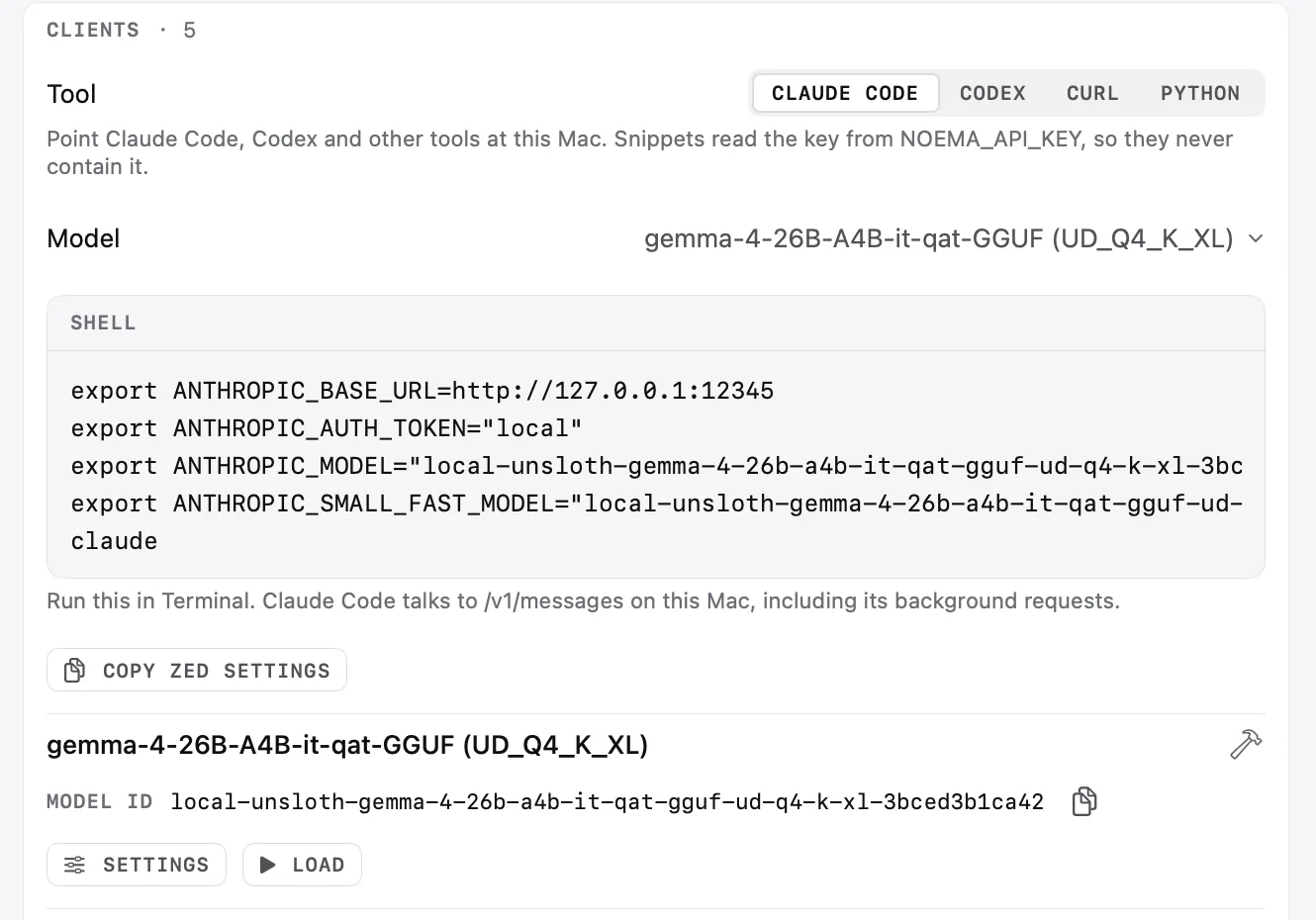
Set the address and key
The samples read the server address and key from environment variables. Use the address from Connection without the trailing /v1. With Require API key off, the server does not check a key; Noema's own Claude Code snippet passes the placeholder local for clients that insist on one.
# The address from Developer → Connection, without /v1.
export NOEMA_BASE_URL="http://127.0.0.1:12345"
# The key, if Require API key is on.
export NOEMA_API_KEY="<your key>"
List the models
/v1/models returns the models the server exposes. Use one of the returned identifiers in every request. The Developer page also shows each model's ID with a copy button.
curl "$NOEMA_BASE_URL/v1/models" \
  -H "Authorization: Bearer $NOEMA_API_KEY"

# Use one of the returned ids for the requests below.
export NOEMA_MODEL="<model id>"
Send a chat completion
/v1/chat/completions accepts the OpenAI Chat Completions request format.
curl "$NOEMA_BASE_URL/v1/chat/completions" \
  -H "Authorization: Bearer $NOEMA_API_KEY" \
  -H "Content-Type: application/json" \
  -d @- <<EOF
{
  "model": "$NOEMA_MODEL",
  "messages": [
    {"role": "user", "content": "Explain a context window in two sentences."}
  ]
}
EOF
Use an SDK
Point an official SDK at the Mac. The OpenAI SDK's base_url includes /v1; the Anthropic SDK adds /v1/messages itself, so its base_url is the bare address. Install them with pip install openai anthropic.
import os
from openai import OpenAI

client = OpenAI(
    base_url=f"{os.environ['NOEMA_BASE_URL']}/v1",
    api_key=os.environ["NOEMA_API_KEY"],
)

response = client.chat.completions.create(
    model=os.environ["NOEMA_MODEL"],
    messages=[{"role": "user", "content": "Explain a context window in two sentences."}],
)
print(response.choices[0].message.content)
The OpenAI example calls /v1/chat/completions; the Anthropic example calls /v1/messages.
Authentication
Each client sends the key its own way by default: curl in these samples and the OpenAI SDK as an Authorization: Bearer header, the Anthropic SDK as an x-api-key header. Use the credential exactly as Noema's Local API settings present it.
For an authentication error, check the selected credential and the paired device. Revoke access under Authorized devices for a client you no longer use.
Other endpoints
/v1/responses accepts the Responses request format, and /v1/messages/count_tokens returns a token-count estimate for Messages clients.
Compatibility depends on the endpoint and the model. Tool calling, image input, context length and generation behavior stay limited by the selected model; an endpoint name does not imply support for every hosted-provider feature.
Call the server from another device
Enable local-network serving and pair the device with the QR flow, or configure the displayed credentials. If the client reaches the Mac by a custom DNS name, add that name to Trusted hosts.
The listener can use HTTP on a trusted local network. Do not assume Constellation's encryption applies to this separate API; keep it on a network you control.